Wednesday, November 11, 2015

New Chart Types in SSRS 2016

Two new chart types are introduced in SSRS 2016 CTP3. Tree Maps and Sunburst Charts

Tree Maps

What are Tree Maps
Tree maps use nested rectangles to show hierarchical data. The size of rectangle is proportionate to the numeric quantity.

When to use Tree Maps
Tree maps are good for viewing hierarchical data, seeing contribution of each category to the whole & for comparing proportions between categories.

Getting Started with SSRS 2016

Install Visual Studio 2015 or 2013.

Creating Tree Maps in SSRS 2016

We will use the following query against AdventureWorks database to generate the Tree Map.

SELECT
cast(round(sum(f.SalesAmount)/1000,0) as int) SalesAmount,
t.SalesTerritoryGroup, t.SalesTerritoryRegion
FROM [dbo].[FactInternetSales] f
JOIN [dbo].[DimSalesTerritory] t
 on t.SalesTerritoryKey = f.SalesTerritoryKey
WHERE OrderDate between '20120101' and '20131231'
GROUP BY t.SalesTerritoryGroup, t.SalesTerritoryRegion

Steps

1.       Create a new chart report in Visual Studio.
2.       In the chart type select “Tree Map”


3.       Fill in Category Groups, Series Groups and Values.


4.       In the Tool Tip Add Sales Amount ( Right Click on Chart and Select “Series Properties”  to see tooltip)


The report is ready !!


Sunburst Charts

What are Sunburst Charts
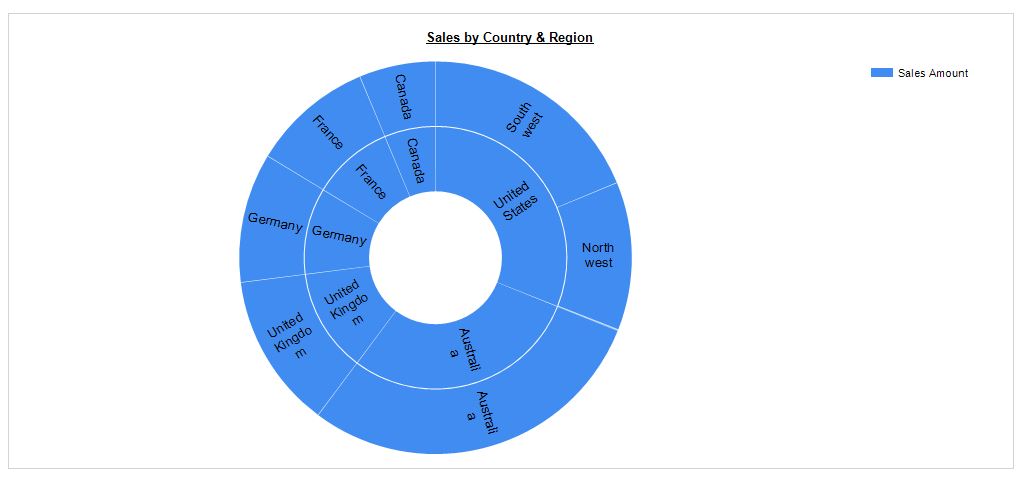
Like tree map, sunburst chart is good for displaying hierarchical data. The rings of sunburst represent hierarchies. The innermost circle represents top level hierarchy and outermost circle represents the lowest hierarchy. Note: When there is a no hierarchy, a sunburst looks like a doughnut chart.

Creating Sunburst Chart in SSRS 2016


To create sunburst chart, select chart type as Sunburst.


Fill in Category Groups, Series Groups and Values.


The chart is ready !!


To show concentric circles for hierarchy levels, add the levels to category groups.


Treemaps vs Sunburst Charts
  • Tree maps are better suited to compare values among levels in a hierarchy. This is because our mind can distinguish rectangles easier than slices in a sunburst chart.
  • When there are more than two levels in a hierarchy, a tree map can get confusing, a sunburst can easily display multiple levels of hierarchy by adding additional concentric circles.
  • Tree maps do not waste space and can show lot more data than sunburst. The sunburst chart can waste lot of data space because they fit circles inside a rectangular window.


Monday, November 9, 2015

System Versioned Temporal Tables in SQL Server 2016

A system versioned temporal table keeps full history of changes and allows point in time analysis. 
For such tables SQL Server creates & maintains a history table. When a row is modified or deleted, it is time stamped & moved automatically to history table first.

Creating Temporal Table

CREATE TABLE dbo.Customer
(
-- Primary Key is Required for Temporal Tables.
ID int NOT NULL PRIMARY KEY CLUSTERED,
Name varchar(50) NOT NULL,
MaritalStatus varchar(20),

-- Define Period Columns
StartEffectiveDate datetime2 GENERATED ALWAYS AS ROW START HIDDEN NOT NULL,
EndEffectiveDate datetime2 GENERATED ALWAYS AS ROW END HIDDEN NOT NULL,

-- Designate Period Columns
PERIOD FOR SYSTEM_TIME (StartEffectiveDate ,EndEffectiveDate)
)
WITH
(SYSTEM_VERSIONING = ON -- Mark table as System Versioned.
    (HISTORY_TABLE = dbo.Customer_History) -- Name of History Table.
);
GO


-- Insert Data into temporal table.
INSERT INTO dbo.Customer values ( 1,'John', 'Single'), (2,'Jack', 'Married')

-- Query Temporal Table
select * from dbo.Customer


ID
Name
MaritalStatus
1
John
Single
2
Jack
Married

-- Query History Table
select * from dbo.Customer_History

(0 row(s) affected)


Updating Data

update dbo.Customer
Set MaritalStatus = 'Married' where ID = 1

-- Query Actual Table
select * from dbo.Customer

ID
Name
MaritalStatus
1
John
Married
2
Jack
Married


-- Query History Table (Times are in UTC)
select * from dbo.Customer_History

ID
Name
MaritalStatus
StartEffectiveDate
EndEffectiveDate
1
John
Single
11/9/2015  9:09:56 PM
11/9/2015  9:11:54 PM


Deleting Data

delete from dbo.Customer where ID = 2

-- Query Temporal Table
select * from dbo.Customer

ID
Name
MaritalStatus
1
John
Married


-- Query History Table
select * from dbo.Customer_History

ID
Name
MaritalStatus
StartEffectiveDate
EndEffectiveDate
1
John
Single
11/9/2015  9:09:56 PM
11/9/2015  9:11:54 PM
2
Jack
Married
11/9/2015  9:09:56 PM
11/9/2015  9:14:54 PM


Point in Time Analysis

SQL Server introduced special clauses to allow querying for point in time analysis.
FOR SYSTEM_TIME AS OF <DateTime2>  gives state of table as of the specified time. (Excluding the boundary value)


select * from dbo.Customer FOR SYSTEM_TIME AS OF '2015-11-09 20:52:00'

ID
Name
MaritalStatus
1
John
Single
2
Jack
Married


Dropping Temporal Table

ALTER TABLE [dbo].[Customer] SET ( SYSTEM_VERSIONING = OFF )
DROP Table dbo.Customer
DROP TABLE dbo.Customer_History


Tuesday, November 3, 2015

Live Query Stats in SQL Server 2016

Live Query stats feature in SQL Server 2016 shows execution plan of a query in real-time.

This can be very valuable for debugging long running queries. User will not have to wait for query to complete to see where it’s spending most of time, it can be viewed while query is executing.

The live query stats can be displayed for current session in SSMS by clicking on “Include Live Query Stats” button.

The real time information displayed includes
  • % complete, both at overall query level and operator level.
  • Elapsed time, for each operator.
  • Number of rows processed for each operator so far (When you mouse over the operator).


Sunday, November 1, 2015

Column Store Index Enhancements in SQL Server 2016

SQL Server provides following enhancements for column store indexes

Clustered Column Store Index Enhancements.
  1. Support for PRIMARY KEY and FOREIGN KEYS.
  2. Support for Non clustered ROW Store Indexes.


Non Clustered Column Store Index Enhancements
  1. Support for Updates on the underlying table.
  2. Support for Filtered Non Clustered Column Stored Index. 


Test Clustered Column Stored Index Enhancements

-- CREATE Test Table for Clustered Column Store Index.

;with cte_nums as (select
 row_number() over ( order by (select null) ) as rowno
  from sysobjects o1 cross join sysobjects o2 cross join sysobjects o3
  )

select isnull(rowNo,0) as ID, ABS(CHECKSUM(NEWID())) % 10000 Val1, ABS(CHECKSUM(NEWID())) % 1000 Val2
into dbo.TestCCI
from cte_nums
where rowNO <= 1100000

-- CREATE Clustered Column Store Index.
create clustered columnstore index ccixTestCCI on dbo.TestCCI

------------------------------------------------
--- PRIMARY KEY SUPPORT ------------------------
-- CREATE Primary Key---------------------------
------------------------------------------------
alter table dbo.TestCCI add constraint PK_TestCCI primary key(ID)

------------------------------------------------------
--- Support for Non Clustered Index. -----------------
-- CREATE Non Clustered Index ------------------------
-------------------------------------------------------

create index IX_TestCCI_Val2 on TestCCI(Val2)


-- Check the Space Utilization by Indexes.
SELECT i.name AS Index_Name
    ,SUM(s.used_page_count) * 8 AS SizeKB
FROM sys.dm_db_partition_stats AS s
INNER JOIN sys.indexes AS i ON s.object_id = i.object_id
    AND s.index_id = i.index_id
where object_name(i.object_id) = 'TestCCI'
GROUP BY i.[name]
ORDER BY i.[name]

-- The RowStore Indexes use More Space than COlumnStore Indexes.

Index_Name
SizeKB
ccixTestCCI
5312
IX_TestCCI_Val2
24072
PK_TestCCI
28432


-- Index Usages
select count(*) from dbo.TestCCI where ID > 1000000 -- Uses Clustered Column Store Index
select Max(Val2),Min(Val2) from dbo.TestCCI -- Uses RowStore Index (IX_TestCCI_Val2)
select SUM(Val2) from dbo.TestCCI -- Uses Clustered Column Store Index.


Test Non Clustered Column Stored Index Enhancements

-- CREATE Test Table for Non-Clustered Column Store Index.

;with cte_nums as (select
 row_number() over ( order by (select null) ) as rowno
  from sysobjects o1 cross join sysobjects o2 cross join sysobjects o3
  )

select isnull(rowNo,0) as ID, ABS(CHECKSUM(NEWID())) % 10000 Val1, ABS(CHECKSUM(NEWID())) % 1000 Val2
into dbo.TestNCCI
from cte_nums
where rowNO <= 1100000

-- CREATE Non-Clustered Column Store Index.
create columnstore index nccixTestCCI on dbo.TestNCCI (id, val1, val2)

--------------------------------------------------------------------------
--- Non Clustered Column Store Index Supports Updates. -------------------
---- Update the table having Non Clustered Column Store Index ------------
--------------------------------------------------------------------------

update TestNCCI
set Val2=10 where ID=1000000

-- Check the Space Utilization by Indexes.
SELECT i.name AS Index_Name
    ,SUM(s.used_page_count) * 8 AS SizeKB
FROM sys.dm_db_partition_stats AS s
INNER JOIN sys.indexes AS i ON s.object_id = i.object_id
    AND s.index_id = i.index_id
where object_name(i.object_id) = 'TestNCCI'
GROUP BY i.[name]
ORDER BY i.[name]

-- The ColumnStore Index uses less space compared to table.
Index_Name
SizeKB
NULL
27256
nccixTestCCI
8904


---- Testing Filtered Non-Clustered Column Store Indexes.

;with cte_nums as (select
 row_number() over ( order by (select null) ) as rowno
  from sysobjects o1 cross join sysobjects o2 cross join sysobjects o3
  )

select isnull(rowNo,0) as ID, ABS(CHECKSUM(NEWID())) % 10000 Val1, ABS(CHECKSUM(NEWID())) % 1000 Val2
into dbo.TestFilteredNCCI
from cte_nums
where rowNO <= 1100000


--------------------------------------------------------------------------
--- Filtered Non Clustered Column Store Index Support. -------------------
---- Create Filtered Non Clustered Column Store Index  ---------------------
--------------------------------------------------------------------------
create columnstore index FilteredNCCIXTestCCI on dbo.TestFilteredNCCI (id, val1, val2) where id < 1000000

-- Index Usages
select sum(val2) from dbo.TestFilteredNCCI where ID > 1000000 -- Uses table
select sum(val2) from dbo.TestFilteredNCCI where ID < 1000000 -- Uses Filtered Column Store Index